Cada día ofrecemos un programa licenciado GRATIS que de otra manera tendrías que comprar!
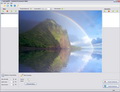
Giveaway of the day — Animated Screensaver Maker
Animated Screensaver Maker estaba como Giveaway el día n 3 de octubre de 2010

Animated Screensaver Maker le ayudará a decorar su escritorio con un número ilimitado de protectores de pantalla animados con efectos asombrosos. Todo lo que necesita para crear un protector de pantalla es una foto y esta herramienta.
Muchos constructores de pantalla le permiten crear protectores de pantalla únicos a partir de presentación de diapositivas o utilizar animaciones creadas previamente. Pero con Animated Screensaver Maker se pueden crear fácilmente animaciones desde la comodidad de su casa. Por ejemplo, puede agregar efectos meteorológicos, a su vez una foto en un mundo submarino con peces en movimiento, o crear un fondo de mar.
Características:
- Muchos objetos animados como lluvia, iluminación, peces, destellos, y así sucesivamente
- Haga su propio screensaver en segundos
- Un modo diapositivas con pantalla antigua está disponible
- Fácilmente haga un protector de pantalla en formato. SCR o instalelo en el computador directamente
- Cree protectores de pantalla de todo tipo de formatos de imagen (jpeg, bmp, tga, etc.)
- Hay muchos ejemplos y artículos relacionados (ver secciones Galería y preguntas más frecuentes)
The current text is the result of machine translation. You can help us improve it.
Requerimientos del Sistema:
Windows Vista/ XP
Publicado por:
DesktopPaints.comPágina Oficial:
http://www.desktoppaints.com/Tamaño del Archivo:
7.59 MB
Precio:
$24.77
Mejores Titulos
Animated Wallpaper Maker will help you turn your static photos into animated pictures and set them as your desktop background. You can animate any photo you have. Really! You don't need expensive, complicated software anymore. You can create your own animated wallpaper in just a few mouse clicks. Load a picture, adjust animation parameters, and place the result on your desktop.
Would you like to escape to the ocean depths? Dolphin Aqua Life 3D Screensaver takes you to the bottom of the aquatic world. The soothing movement of the dolphin and the calming sound of the waves help you to relax after a busy day. Enjoy the serenity of Aqua Life, the graceful dolphin swimming through the blue depths and the amazing play of light on its skin.
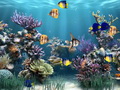
Set a virtual animated aquarium as your desktop wallpaper. This animated wallpaper from AnimatedWallpaper7.com doesn't require installation or additional software to run. Once downloaded, it can be set on your desktop in one mouse click. It supports Windows XP/Vista/7 as well as Aero and dreamscene.
GIVEAWAY download basket


Comentarios en Animated Screensaver Maker
Please add a comment explaining the reason behind your vote.
Although the software is basically nice I have several reservations.
1. Every time you start the program my firewall pops up telling me x:\Program Files\Common Files\Thraex Software\AutoUpdator\AutoUpdator.exe wants to contact the internet, which I obviously disallow. There is no option to disable this behaviour as is customary in well-behaved software. I, for the moment, had to rename the file in order to get rid of that. I prefer that over having my firewall blocking it by default just in case I would start it while having my firewall temporary disabled. I very much dislike such behaviour in software and I know I'm not the only one. It would probably have no detrimental effect on the software's functioning to delete this directory with that file.
2. At start-up it always maximises itself and it doesn't 'remember' its last exit size/location as it should.
3. The Add Animation window is annoyingly small causing the need to use a scroll bar when I have a huge screen that would allow a much bigger dialog window which would allow me to select an animation without having to use a scroll bar. I don't understand why developers don't understand this should be done differently.
4. When saving the screensaver it would save me a lot of clicks if there were a few buttons selecting the directory where the .scr file should be saved. "\Windows\system32" would be one for instance since that is where screensavers usually reside. Another would be a user-definable default path which you should be able to define in some options window. I mean... really... no 'Options' or 'Settings' window?
5. The created screensaver's animation stutters even when CPU use is modest and my 3D accelerated graphics card can handle animated screensavers which seem to be much 'heavier'.
6. I wanted to use the "Import image" option to add an image of the moon that I wanted to drift slowly across the sky. Unfortunately I don't seem to be able to set a fixed level where the motion should occur resulting in the moon crawling over the foreground objects in the bottom of the screen or wherever it likes. This option should be added.
7. It would be nice if you could constrain certain animations to certain areas of the screen. Also a few more animations would be nice. Butterflies and hopping and pecking birds for instance. For such birds an area constraint would be necessary.
So: Nice... but still with ample room for improvement.

Needs a means to preview what you are going to use... like the thumbnails or filmstrip in Explorer. Due to my work, I have hundreds, which DO preview in the various apps that I use. Elsewise, it's quite good!
It is a great program.But I'd like to add sound to the screensaver.
ATTN wtfisthis - please let us know the make and version number of your virus scanner so we can all avoid it. Thank you.
(hint: false positives are not helpful)
The program works really well with lots of animations you can add to your graphics including ripples, fog, sparkles, fire, falling leaves, etc, and with just a click. The animations are good quality except on my 2 year old laptop the fog effect was a little jerky. I just wish there was an option to export the finished animation as an avi. I know this isn't within the description, and screensaver maker is what the program claims it is, and it does this fantastically well.
For those who want to make their own eye-catching screensavers, this program is the one for you. But it won't do more than that. It's not a movie-maker.
Ofertas de hoy para iPhone »


Ofertas de hoy para Android »


El programa antivirus que tengo (AVIRA) detectó un virus en el momento de descargar e instalar el programa
Save | Cancel
Execelente programa. Para mi 10 puntos.-
Save | Cancel