Cada día ofrecemos un programa licenciado GRATIS que de otra manera tendrías que comprar!
Giveaway of the day — Bookmark Docs
Bookmark Docs estaba como Giveaway el día n 25 de enero de 2011

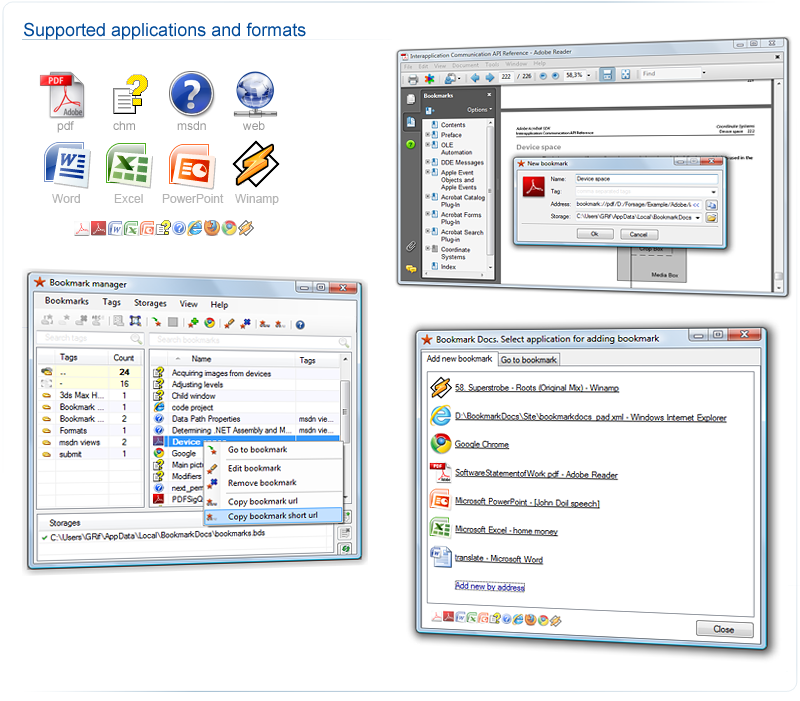
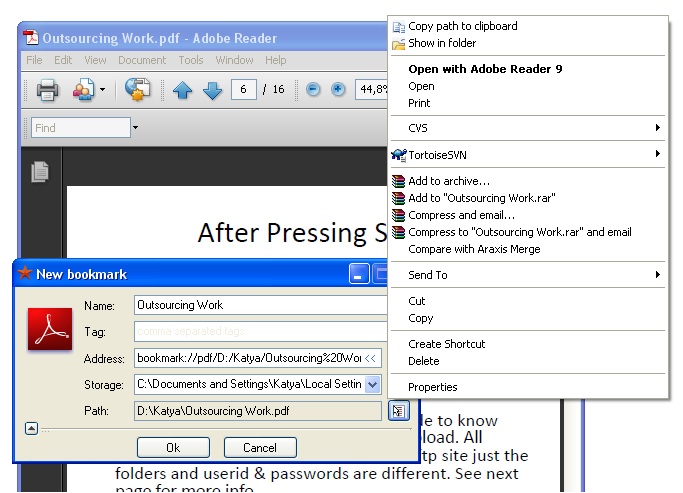
Agregar Docs a favoritos es una herramienta de navegación por documentos nuevos. Agregar a Bookmark Docs le da la facultad de añadir marcadores e hipervínculos a una ubicación específica en Microsoft Word, Excel, PowerPoint, PDF, CHM, y los documentos de MSDN, así como las páginas web.
Sólo tiene que utilizar a Bookmark Docs para agregar un marcador, y luego regresar a ellas siempre que lo necesite, y hacer todo lo que desee de una manera unificada. Puede generar un hipervínculo a un lugar determinado en el documento. Los usuarios pueden compartir y etiquetar marcadores y también colaborar en un conjunto de marcadores para la gestión de proyectos a través de formatos.
The current text is the result of machine translation. You can help us improve it.
Requerimientos del Sistema:
Windows XP, Vista, 7
Publicado por:
BookmarkSoftPágina Oficial:
http://www.bookmarkdocs.com/Tamaño del Archivo:
3.88 MB
Precio:
$24.95
GIVEAWAY download basket




Comentarios en Bookmark Docs
Please add a comment explaining the reason behind your vote.
Installed and works well so far on XP SP3.
Perhaps this is not intuitive or easy to master - but the concept is so helpful! Let me give you an idea of how you might use this.
I am a student. I download PDF's of academic materials a lot, and while reading I have an idea of how I might use this for my thesis. Up to now, I would just close the article, and next time I read it I have no idea where I was and what I saw there that excited my imagination.
It looks like that with this tool, I can mark the place, tag it under a name I have for the idea, and later search for the exact spot.
What is missing though is the ability to add a note to each bookmark and not just a tag.
I would also be really happy if the bookmarks could be searchable via Windows Desktop Search.
Also, it would be helpful to be able to add a bookmark with a right-click context sensitive menu in Word or Acrobat.

There's something of a help file at the following url:
http://www.bookmarkdocs.com/help.html#adding_bookmarks
I personally prefer to see payware include an integrated help file in the program itself. Quite a lot of people need/prefer to use their software when offline.
I have some freeware apps that provide extensive integrated help files and I take my hat off to the developers of such programs. It's a nice touch and a real courtesy.
So, you think we should tell these developers that Microsoft already HAS this feature built into Office? Right-click and select hyperlink. No mess, no fuss, and no additional software like this needed.
I thought you could already do this? On XP I used to do this all the time. Just right click / create hyperlink and you could link to something within the doc or another file on my pc. Not sure about vista though.
1) Somebody should have mentioned that it requires the applications to bookmark to be installed on the system... It does not detect any portable apps, even if the active window is open! This (important) detail seems to be missing even on the developer's webpage.
2) Unclear how to use this program... Even the online Help leaves much to be desired!
Ofertas de hoy para iPhone »





Ofertas de hoy para Android »





el archivo esta corrupto.
Save | Cancel