Cada día ofrecemos un programa licenciado GRATIS que de otra manera tendrías que comprar!
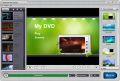
Giveaway of the day — Daniusoft DVD Creator 1.5.0
Daniusoft DVD Creator 1.5.0 estaba como Giveaway el día n 6 de enero de 2011

Grabe sus preciosos vídeos a DVD, con un increíble menú de DVD y compartalos con sus amigos y familiares. Daniusoft DVD Creator le ofrece la forma más fácil y rápida de grabar cualquier formato de vídeo y foto a DVD para su reproducción en diversos reproductores de DVD o de copia de seguridad como archivos ISO o carpeta de DVD. También se puede trabajar con vídeos de alta definición también como los de los formatos vídeo AVCHD (MTS/M2TS), TS, TRP, MOV HD.
Además, usted puede crear menús de DVD con conexión a plantillas preestablecidas a sus fotos favoritas y música en el PC, poner el nombre del DVD que quiera, crear capítulos para los videos para saltar la reproducción e incluso personalizar la vista en miniatura.
Cree su propio estilo de DVD con Daniusoft DVD Creator:
- Grabar cualquier formato de vídeo como AVI, WMV, MP4, MOV, MPEG, VOB, FLV a DVD;
- Convierta sus fotos en presentaciones divertidas que puede compartir y grabar a DVD;
- Suporta videos HD, incluyendo MTS, M2TS, TS, TRP, H.264, etc.
- Copia de seguridad de videos en formato ISO o carpeta de DVD;
- Personaliza tus DVD con menú de plantillas con diferentes estilos;
- Añadir música de fondo para tus videos caseros y PhotoShows;
- Crear el capítulo de DVD y miniatura del título para saltar la reproducción convenientemente;
- Fácil de usar, sólo unos pocos clics para completar la creación de DVD.
Importante:
Para activar el software, debe inscribirse en la página del fabricante href="http://www.daniusoft.com/video-converter-ultimate-gotd-offer.html#Part1"> (versión completa, de forma gratuita). Luego obtendrá un código de registro, con el que puede activar el software.
The current text is the result of machine translation. You can help us improve it.
Requerimientos del Sistema:
Windows XP, Vista, and Windows 7
Publicado por:
DaniusoftPágina Oficial:
http://www.daniusoft.com/dvd-creator.htmlTamaño del Archivo:
36.4 MB
Precio:
$19.95
Mejores Titulos
Daniusoft Video Converter Ultimate is a ultimate video converter that brings you all-round solutions to convert video, rip DVD, remove DRM protection, record videos, burn DVD, download YouTube video and transfer media files to devices like iPod, iPhone 4, iPad, etc.
Daniusoft DVD Ripper is the best DVD Ripper software that helps you convert DVD to pop video & audio formats like MP4, AVI, WMV, MPEG, FLV, 3GP, MP3, M4A, AC3, WMA and rip DVD for various pop multimedia players like iPod, iPhone 4, iPad and PSP, etc.
Daniusoft DRM Converter is professional DRM removal software that removes DRM protection from iTunes M4V/M4P, BBC iPlayer WMV/MP4, and a powerful video converter that converts between pop video & audio formats, and even HD videos.
Daniusoft iTransfer is a must-have tool for iPod/iPhone/iPad users to manage movies, music and photos between iPod/iPhone/iPad, PC and iTunes, and convert video & audio for iPod/iPhone/iPad.
GIVEAWAY download basket




Ofertas de hoy para iPhone »


Ofertas de hoy para Android »



Comentarios en Daniusoft DVD Creator 1.5.0
Please add a comment explaining the reason behind your vote.
The Good
* Straightforward and easy to use.
* Can author DVDs from SD and HD videos and create slideshows from images (which are also put onto a DVD).
* Supports many input video formats and the four major image formats.
* Allows users to customize image slideshows, including but not limited to allowing users to change the duration of images, add transition effects, flip images (horizontally/vertically), and add text to images.
* Allows users to burn videos/slideshows directly to disk, create ISO, create DVD folder, or all three.
* Has the ability to automatically create chapters.
* Allows users to preview what the DVD will look like after it has been created.
* Supports DVD-5 and DVD-9.
* Users can select from a handful of DVD menu templates, and can download some more.
* Allows users to automatically shutdown computer after processing has finished.
* Supports drag + drop for importing files.
The Bad
* Does not properly scale/resize videos.
* No features to customize audio tracks or add subtitles to videos.
Free Alternatives
DVD Flick
For final verdict, recommendations, and full review please click here.
Save | Cancel
Very nice looking software.
Installed without a hitch, following directions. It's always nice when you fill out a form with your e-mail and actually receive the e-mail immediately.
Fast loading, doesn't seem to hog CPU. I can't speak for all of the features though - I haven't completed my first conversion.
It's pretty, kind of like a Nero or Roxio program. It's drag and drop based, and I think that's fine.
Although I definitely wouldn't be able to use this every time, as I'm very used to the performance and incredible customization available using ConvertXtoDVD. Nothing...I mean nothing, beats ConvertXtoDVD.
Nevertheless, it looks like a nice program and a little simpler to use. So I rate it well, from what I've seen.
Save | Cancel
Sorry for two comments - but I found many more customizations that I like.
On the preview of the main menu you can click on a frame and edit the text as well as the location of the frame. It autoadjusts nicely when you type in something larger than the default size of the text box.
Also, on the bottom left under that preview you can click the customize button. There are many features there, including putting a custom background image on the menu, and a lot of the other features ConvertXtoDVD offers.
Also, upon clicking "Burn" it gives you a few more options.
Very nice program, really worth the download.
Save | Cancel
It looks pretty good and easy to use. I tried it out and discovered that the free film I had been supplied with (legit I hasten to add!) in mp4 format had DRM and could not be converted and burned. However, I was directed to the offical site where they offer a heavily discounted later version under a different name for £16.22 to GAOTD downloaders only.
I downloaded the trial version and discovered it would convert and burn. It was as easy as pie too, but it only allows 3 minutes of the film so that you can see it works. This was good enough for me as the result looked great so I bit the bullet and bought the full version. I am a happy bunny. But if you want to remove DRM you cannot do it with the free version.
Save | Cancel
I am on Windows 7 64 bit and the drag and drop didn't work.
It's always nice to have a program that creates DVDs that have menus and plays on any DVD player but I only got 3 clips [436mb 215mb 664mb] on a 4.9GB DVDr (not double layer) but I usually can fit 5 or 6 full movies on one if I have them converted to DivX / Xvid (average of 700MB) which will play on my $40 DivX compatible DVD player that I got from Wal-Mart. BTW I use the lowest quality setting just to fit those three vids on there.....but that's kinda' standard with programs like this.
It's still a keeper. I wonder if anyone else had drag and drop issues.
It took 40 minutes for the three clips to be burned but I purposely used 3 different kinds of videos - .MP4, .WMV and MPEG. It took all three which is good.
Thumbs half way up and down.
Save | Cancel