Cada día ofrecemos un programa licenciado GRATIS que de otra manera tendrías que comprar!
Giveaway of the day — File Defender 1.1
File Defender 1.1 estaba como Giveaway el día n 27 de agosto de 2009

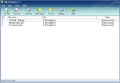
File Defender es un programa tanto poderoso como fácil de usar que protege completamente todos tus archivos importantes. El programa crea archivos encriptados ejecutables, lo que elimina la necesidad de que el programa requiera desencriptar archivos en otros computadores.
Debido a que el programa está basado en un algoritmo super fuerte de encriptación, es imposible acceder a los archivos sin contraseña. Incluye un generador de claves incorporado que crea una combinación absolutametne única. File Defender es muy fácil de usar debido a su interfase sencilla y amigable para el usuario.
The current text is the result of machine translation. You can help us improve it.
Requerimientos del Sistema:
Microsoft Windows 95, 98, 98SE, ME, NT 4.0 (with SP4), 2000, XP, 2003
Publicado por:
Enplase ResearchPágina Oficial:
http://enplase.com/pages/File+Defender+description.htmlTamaño del Archivo:
2.70 MB
Precio:
$34.95
Mejores Titulos
MultiStage Recovery is professional data recovery software for Windows. It can recover files from hard disks, floppy disks, flash drives, digital camera cards, and other digital storage devices. Using MultiStage Recovery, scanning and recovery is very fast and reliable. With comprehensive detection, it finds EVERYTHING that can be restored.
GIVEAWAY download basket




Ofertas de hoy para iPhone »





Ofertas de hoy para Android »





Comentarios en File Defender 1.1
Please add a comment explaining the reason behind your vote.
The Good
* Nice clean and easy to use interface.
* Creates self executable/standalone encrypted files.
* Encrypted files re-encrypt themselves after use.
* You get to chose if you want to save/delete executables or original files.
* Drag + Drop.
* Can encrypt multiple files at once.
* You can password protect File Defender.
* Uses XTEA encryption - light on resources for slower/older computers.
The Bad
* Not Open Source.
* Uses XTEA encryption - not the most secure out there.
* When encrypting, passwords you enter are not hidden by default.
* The original source file is not deleted by default.
* You can't add a 'protected' suffix.
* When extracting file contents, the passwords you enter are not hidden by default.
* You can't extract file contents via standalone encrypted files.
* Standalone encrypted EXE adds on ~650 KB to the file size.
* The "Comment" box is placed very out of the way.
* If you hit "X" on the window where you enter password the password for encrypting, the file will start encrypting.
* You can't chose where to place file once you encrypt it.
* You can't chose where to place file once you extract contents of encrypted file.
* No context menu entry.
* Self extractor doesn't work well with videos (Vista only?).
* If you try to extract more then one file at once, and the passwords are different of the files, you will get an error.
* Most e-mails will reject sending the standalone EXEs as attachments.
Free Alternatives
TrueCrypt
AxCrypt
Kruptos 2
For final verdict, recommendations, and full review please click here.
Save | Cancel
This is a repeat of the April 17, 2007, giveaway, reviewed by BladedThoth. I just don't see the point. You can use the open-source AxCrypt which has much greater security, handles folder as well as file encryption, also automatically re-encrypts, has secure password input, supports key files (and can be combined with password), has automatic secure erase, automatic compression, etc. True, it doesn't generate self-decrypting executables, but there's a standalone viewer (doesn't encrypt) available. If you want something more portable, there's the open-source 7-Zip, although it doesn't have secure-erase or automatic re-encryption.
Save | Cancel
I am still using TrueCrypt,it is free and open-source,really good.
Save | Cancel
Updating my previous comment (in moderation), 7-Zip will automatically re-encrypt if you open an encrypted archive (self-extracting or not) and view within 7-Zip (installed) without extracting (executing self-extracting archives obviously extracts).
Save | Cancel
Keep in mind, if you're running Vista, XP, or 2000, there's at least one "Encrypt" function built into the OS, (and so is "bug-free", as well as "free");
(I haven't fired up my Win98 machine in so long, I don't remember if it's in there as well; I think you need NTFS to really use it with any effectiveness, but check your Windows Help files to be sure, since if you're running a version that supports it, it's a "guaranteed to work" solution, since it's part of the OS, no matter which version you're using);
If you can't find anything in your Windows (built-in) Help files on the subject of encrypting individual files, look for the instructions on making an Encrypted Folder to put your file into, & there's always the Microsoft on-line help system too;
The encrypted folder is usually in a different color & has a different appearance then the default "regular" folder icon, (this is also done by default when a folder is Encrypted).
If you use Windows "built-in" Folder Encryption, you may want to change the icon that the Encrypted folder uses, back to the "standard" folder icon, to "hide it" a little better;
Just use the "Change Icon" button when you right-click the folder & then click "Properties", where you should see the options to change the icon.
Just thought I'd pass that "reminder" along, to those who don't "go digging" into Windows much, (and who never got the 4"-thick Manuals, SDK, & DDK books which those who write the code for drivers & apps for Windows need, for each version of Windows, and that are expensive!)
Have a good morning! :o)
Save | Cancel