Cada día ofrecemos un programa licenciado GRATIS que de otra manera tendrías que comprar!
Giveaway of the day — Presentation Marker
Presentation Marker estaba como Giveaway el día n 4 de abril de 2012

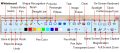
Presentation Marker permite a los usuarios marcar en la pantalla directamente y hacer zoom en ciertas partes para haver una explicación rápida. Además, ofrece más herramientas adicionales - Spotlight, Cortina, Pantalla del reloj digital, Ampliación del puntero, Captura de pantalla, etc
Puede ser una ayuda significativa durante una demostración de producto o una presentación cuando hay una necesidad de hacer anotaciones en la pantalla para una mejor ilustración.
Ofrecemos un 50% de descuento en licencias de por vida en GOTD (actualizaciones gratuitas y actualizaciones y soporte de por vida). Obténgala aquí ahora!
The current text is the result of machine translation. You can help us improve it.
Requerimientos del Sistema:
Windows 2000/ Vista/ XP/ 2008/ 7
Publicado por:
GoldGingko SoftwarePágina Oficial:
http://www.presentation-assistant.com/pmarker/index.htmTamaño del Archivo:
4.43 MB
Precio:
$19.95
Mejores Titulos
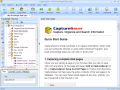
Everyone who surfs the Net comes across information they need to keep. With CaptureSaver you can permanently save selected text, images, and complete Web pages, then edit, mark, organize, and search for information in your offline personal and portable knowledge base. CaptureSaver lets you arrange your data in a free-form hierarchical tree. You can add notes, keywords, even modify the html. When you use CaptureSaver you'll never lose important information, or have to worry about Web sites or pages disappearing never to be found again.
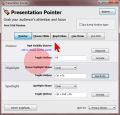
In presentations it's all about to grab and to focus the attention. Presentation Pointer makes it easy for your audience to follow your actions on the screen. It adds cursor highlighting abilities and more visual and audible mouse click effects. It also displays your keystrokes in an overlay at the bottom of the screen and allows you to draw on a video as it was playing.
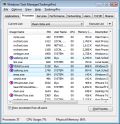
TaskmgrPro enhances Windows Task Manager and provides powerful features. You can batch kill or resurrect processes in the Processes tab, batch stop or start services in the services tab, view all established TCP connections in the additional TCP/IP tab, manage the Windows startup procedure in the additional Startup tab, schedule shutdowns/reboots/... in the additional Shutdown tab and manage shared folders easy in the additional Shares tab.
GIVEAWAY download basket



Comentarios en Presentation Marker
Please add a comment explaining the reason behind your vote.
I am starting to wonder if there is just one individual who logs in every day and comments that every giveaway should be skin-able. It seems to me that the commenter who asked that everything be portable has either toned it down or more appropriately noted this only for giveaways where it would add value.
I do agree that there is a lot of "ugly" or dated software out there, but I am rarely sure that having lots of choices for skinning would make for a more useful product. Appearance is important, but to me, the comments might be more useful if they referred to something other than color.

Free alternative: ZoomIt!
http://technet.microsoft.com/en-us/sysinternals/bb897434
Of course ZoomIt! doesn't have so many "widgets" and features to draw on screen, but is lightweight (267 KB).
Installed easy on MSWindows 7 64 bit.
Be sure to cut & paste the user & serial number, as it is very long and case sensitive, and includes letters, numbers, and symbols. When I clicked to "unlock" after putting in user & serial number, I got an error message as far as contacting the servers, but about 3 seconds later the message went away and the software was unlocked & registered.
Cool little tool that opens with an auto-hiding dock. It can draw on the desktop, on an open window, can save screenshots or just the drawing. Would be good when guiding someone through some settings or fixing a problem.
Also good as a doodler, or for quick sketches. Good also for keeping kids from messing up anything that might be open on your computer, as it takes control of the mouse and doesn't release it without going to the dock to release it.
Works fine with a mouse or touchpad, don't have a touchscreen or wacom to try it with. Control is as good as your control of the mouse, if using a mouse with this program.
It's almost like using the old "Paint", but can use it with anything showing on the desktop, not just limited to it's own application window.
This is not as useful as i thought , i downloaded everything went smooth but i found the buttons and the configuration quite quirky and less flexible.
Sorry thumbs down for me:
FANTASTIC Program for an instructor like myself, who routinely has to demonstrate techniques on the projected computer screen.
Thank you so much for bringing this program to my attention ! I would have never known such a useful piece of software existed had it not been for GiveAwayOfThe Day. Thank You !!
(It's also nice to see that GiveAwayOfTheDay has been offering something other than just the endless stream of video and photo editors for a change!! Is it just me, or do those video editors ALL appear to be essentially the exact same program with nothing more than a different name and skin applied ??????)
How would I improve today's GiveAway ? Well, I was ready to take advantage of the 1/2 price offer and upgrade to the Pro Version until I seen it required using PayPal. I do not have a PayPal account, nor do I wish to start one. Had it not been for that, I would have upgraded on the spot I was so impressed with this utility.
Ofertas de hoy para iPhone »



Ofertas de hoy para Android »





Me parece una herramienta interesante que el soft que uso p/mis demos no tiene... A probar y agradeciendo.
Save | Cancel
Dear Users,
Please note your registration information is not expected to arrive to your e-mail. User ID and Serial number will appear on the web page when you hit "Get the Code Now".
Please re-submit your data to have the registration details.
Thank you and have a nice Day!
Giveaway of the Day Project team
Save | Cancel