Cada día ofrecemos un programa licenciado GRATIS que de otra manera tendrías que comprar!
Giveaway of the day — Screen Dash
Screen Dash estaba como Giveaway el día n 17 de marzo de 2009


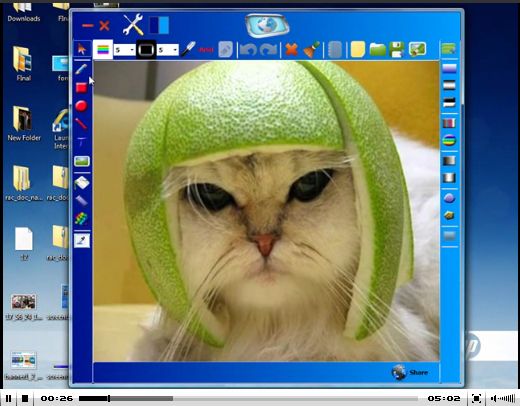
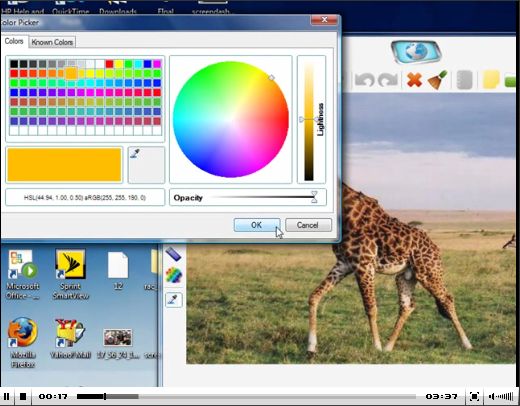
Screen Dash es el único programa web que te permite tomar imágenes diractamente desde la pantalla, editalas usando las herramientas para edición de fotografías, y de inmediato las puedes poner en línea. Para el usuario promedio, el ahorro en tiempo es del alrededor de dos minutos lo que toma imprimir desde la pantalla, pegar en paint, y luego ir al sitio para alojarlas.
Premium Dash 2.1incluye herramientas avanzadas para edición de fotografías, una libreria PNG completamente transparente, la habilidad de alojar tus propias imágenes con FTP, y la increible habilidad de usar tu propio Google Adsense y de hecho beneficirte de las imágenes que cargues. Screen Dash is es una increible utilidad que te permite, no sólo eliminar de eliminar las imágenes alojadas, sino que también ediatr las imágenes; además, te ayuda a ahorrar una consideable cantidad de tiempo y esfuerzos.
The current text is the result of machine translation. You can help us improve it.
Requerimientos del Sistema:
Windows XP, 2000, Vista
Publicado por:
N-VisionIT InteractivePágina Oficial:
http://screendash.com/Tamaño del Archivo:
14.7 MB
Precio:
$30
Ofertas de hoy para iPhone »





Ofertas de hoy para Android »



Comentarios en Screen Dash
Please add a comment explaining the reason behind your vote.
First impressions:
1. On capture mode it blurs the screen for some unknown reason. This is annoying.
2. One only gets one chance at drawing the selection rectangle. I would like to be able to make small corrections to it after tracing it up.
3. It puts itself in both the task and quick bars. No idea why the quick bar, and the task bar entry has no label.
4. It supplies its own photo editing tools. I would prefer for it to interface with my own tools.
5. The only capture mode seems to be the rectangle. I haven't found any capture mode for capturing the current window.
A free alternative that does all of the above is Gadwin Systems PrintScreen.
Thumbs down, for not having enough functionality of the interesting kind and having too much of the non-interesting kind.
Save | Cancel
I'm not impressed :(.
It started with a tutorial on right side of screen and the main Interface (without any main menu) was not workable as most of the controls were disabled, until I completed the tutorial by clicking Next and then Finish button (there is no Back button in tutorial :( )
After finishing the tutorial the application resides in task bar as an icon without any popup or any other menu.
The interface is fair, but usage is not as standard as it is in most Windows Graphics Applications.
Overall, its not user friendly enough for everyone :(
Save | Cancel
The Good
* Allows you to upload screenshots directly onto ScreenDash.com.
* You don't need to register to upload screenshots onto ScreenDash.com.
* You can upload screenshots directly to an FTP server.
* You can have screenshots attached to an email.
* You can place your own Ads on the ScreenDash.com page where your image is.
* Built in editor has basic editing features + ability to add effects.
* You can save your screenshots as PNG, JPG, GIF, BMP or TIF/TIFF.
* Has a nice simple tutorial that will guide you through how to use the software.
The Bad
* Cumbersome interface.
* Only has a freeform screen/region capture tool.
* Uses more computer resources then some rival software.
* If you choose to upload directly onto ScreenDash.com, you have no control over image after upload.
* By default the program is set to display ScreenDash.com Ads on your image pages.
Registration and installation
When you run Setup.exe Screendash.msi will need to be first extracted. By default it will be put in C:/ but you can change that. After you extract it, run Screendash.msi. As for registration, I have been unable to find information on if it registered properly or not so I can only assume it worked.
Free Alternatives
FastStone Capture
Jing
Screenshot Capture
EasyCapture
Snipping Tool (Vista only)
Screenshot Capture
For final verdict, recommendations and full review, please click here. I can say though I give Screen Dash a reluctant thumbs up and don't recommend it.
Save | Cancel
Interface is circa 1990. Not user friendly at all. It's just plain ugly.
There are far better freeware screenshot utilities available such as Fastone Capture 5.3 and Rumshot
I visited the ScreenDash site and it appears that they charge for at least one of their "tutorials" since they call it a "premium" tutorial. It also appears that they plan to do so more in the future.
$30 would be way too much even if all tutorials were free.
It does have a few cool features, but overall it's barely a 2 out of 10. (10 being the best).
Give the freeware utilities I've provided above a try. You'll find you are much less frustrated & it won't be so hard on your eyes.
Did I mention how ugly the ScreenDash interface is?
Save | Cancel
Install is a bit weird. Run Setup.exe to a temporary folder on your hard drive, then execute the msi file from within it to create a folder in C:\Program Files\. But this overcomes registration, so I guess it's a fair trade off. Before the complainers start it requires the .NET framework.
Just tried it quickly and it seems to do what it says and very nicely. As screen capture software goes, this definitely seems to have the Woohoo! factor. A lot of overkill for the majority of screen capture requirements, but for those times when you need to alter, collage or otherwise manipulate a screenshot, brilliant in my opinion.
Save | Cancel