Cada día ofrecemos un programa licenciado GRATIS que de otra manera tendrías que comprar!
Giveaway of the day — Black&White projects 5 elements (Win&Mac)
Black&White projects 5 elements (Win&Mac) estaba como Giveaway el día n 5 de marzo de 2019
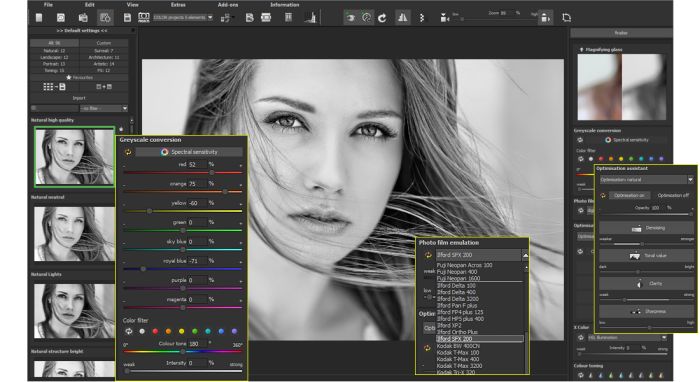
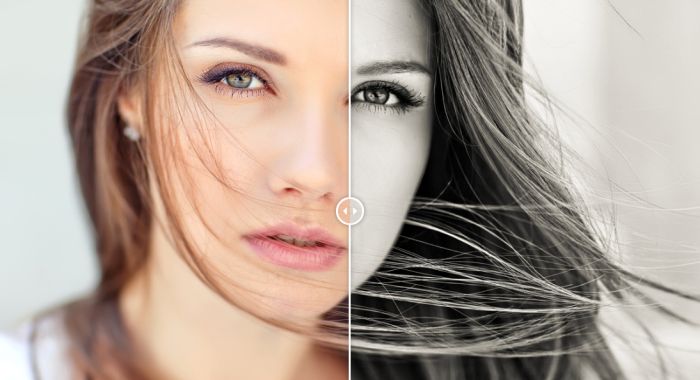
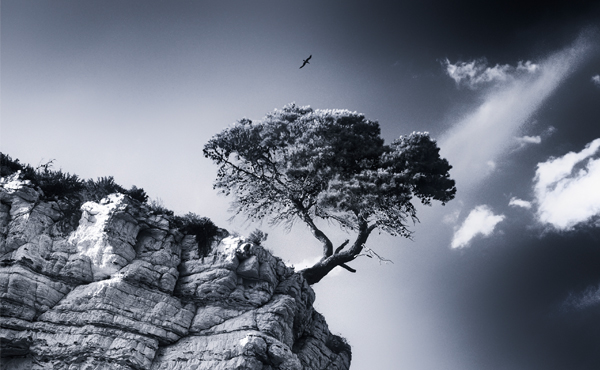

B&W Projects 5 Elements ofrece la nueva y exclusiva oportunidad de transformar fotografías digitales en color en grandes obras maestras, al mismo tiempo que utiliza herramientas inteligentes con un flujo de trabajo eficiente y cristalino. Muchas fotografías reconocidas están en blanco y negro y, a menudo, son las versiones en blanco y negro de una foto, ¡las que más se recuerdan!
- Transformación B / W de vanguardia con 96 ajustes previos hechos a mano para obras maestras fantásticas;
- Filtros expertos de alta calidad, incluidas las aplicaciones selectivas expandidas;
- Optimización automática del brillo de los archivos de imagen, dinámica de color, rectificación del trapecio y corrección de flexión de la luz;
- Procesa todos los formatos de imagen populares, incluido RAW;
- Superficie del programa adaptable, incluido 4K.
The current text is the result of machine translation. You can help us improve it.
Requerimientos del Sistema:
Minimum: Windows 10/ 8/ 7 (32 Bit), Prozessor Core Duo, 2 GB HDD, 1.280 x 1024 Pixels Screen Resolution, Graphic: DirectX-8-compatible, 128 MB, 32 bit colour depth; Mac OS X ab 10.7 (64 Bit), Prozessor Intel/G5, 2 GB HDD, 1.280 x 1024 Pixels Screen Resolution
Publicado por:
FRANZIS Verlag GmbHPágina Oficial:
https://www.projects-software.com/black-white/black-white-projects-5-elementsTamaño del Archivo:
224 MB
Precio:
$29.95
GIVEAWAY download basket


Ofertas de hoy para iPhone »





Ofertas de hoy para Android »




Comentarios en Black&White projects 5 elements (Win&Mac)
Please add a comment explaining the reason behind your vote.
B&W film had [has] different characteristics than color that can distinguish the right shots as more artistic. The way our brains work also comes into play -- a B&W version of an originally color photo can have quite a bit more drama. Much is lost if/when you simply open a photo in whatever image editing app & do a simple conversion to B&W, where extra data is just tossed out, & whatever you're left with, that's it. Importantly, Black & White Projects tries to use All the data from your color shots.
Black & White Projects works similarly to the B&W conversion tools in Photoshop / Lightroom and other, more capable editing software [including The GIMP], but its presets can make life [sometimes much] easier. You're controlling how different parts of the color spectrum get mapped to the shades of gray, and how much influence each of those parts has in the overall picture. As you might guess, without presets showing the basic results, that can involve a lot of trial & error.
Black&White projects 5 elements also lets you mimic the characteristic looks [e.g. grain] of several B&W films. What's missing from B&W Projects [including the top of the line B&W Projects 6 Pro] is the rest of an image editing app -- that means your work is limited by the characteristics of your original shot. If you were to do a similar B&W conversion in a full editing app, you could for example edit the curves to change the original beforehand -- while not everyone is going to go to that amount of work / bother, that can make a sometimes very big difference in the final result. While it won't be quite as interactive as using the editing app's conversion engine, using B&W Projects as a plug-in should still get you there.
It's nice that Franzis is [finally] coming out with newer versions of its giveaways -- I feared that we'd be forever seeing the same older versions. If you find yourself really liking any of the Franzis giveaways, it can take a while, but sooner or later Franzis will run a sale on the current pro version upgrade that takes away a lot of the pain moving to their current, most capable versions. I've never seen any Franzis software rated best-in-class by pros, but it's generally in the top 5. The most common complaint I've seen is that their software can be harder to use than their competition.
Their software is also easy to deal with practically speaking, not sending its roots deep into Windows like some competing software -- B&W Projects 5 Elements is something you should grab while it's on GOTD if you do any image editing at all, even if you're unsure whether you'll really use it, because there's really little reason not to. And FWIW, when I installed a new version of win10 on a new drive in this PC, I simply copied the Franzis folder, re-registering all the individual apps using the GOTD keys I'd gotten.
Save | Cancel
.
[ mike ],
Thanks.
I like filtered grayscale from FREE Google Picasa -- like retaking a color photo with "black-and-white" film but through your choice of a color filter from a rainbow of choices, red and green are particularly revealing in their stark differences generated from color photo originals, and all other whole-picture adjustment can be made before and after, such as contrast, gama, saturation, highlights, midtones, shadows, sharpening, even film grain, and once happy, adjustments can be copied to other photos or groups of photos, and the originals NEVEr get touched.
Lookie here at this ONE picture through RED filter, GREEN filter, and in COLOR:
RED filter B&W: https://www.flickr.com/photos/peterblaise/3570467381/in/dateposted-public/
GREEN filter B&W: https://www.flickr.com/photos/peterblaise/3571276186/in/dateposted-public/
COLOR: https://www.flickr.com/photos/peterblaise/3570466867/in/dateposted-public/
Though, as you say, without color filters, FREE IrfanView can drop to grayscale, and allows significant pre-adjustment to "curves" before and after -- contrast, gamma, and saturation, including color replacement, effectively color filters, and can batch operate on single, multiple images, and multiple folders, also leaving the originals intact.
And neither "sending its roots deep into Windows", whatever that means.
FREE stuff is hard to beat.
Even Adobe Photoshop is FREE direct from Adobe ( older non-subscription versions, web search for them ).
Franzis software may be fun to play with once, but I've never felt compelled to open ANY Franzis program a second time, because ( a ) they are one-trick-ponies, and ( b ) their controls are unique unto themselves and awkward and obtuse.
I'd rather use all-purpose programs like FREE Google Picasa and FREE IrfanView that offer what Franzis offers, and more, all the time, with prototypically standard and easy-to-use user interfaces
And no registration and membership hoops to jump through..
.
Save | Cancel
Hi I have made this comment before. I do not think it is just me but although the GOTD looks amazing I am totally confused on how to get it, copy this, paste that add an I/d put in the password go here go there. Look if the gift is really a gift then please why make it so difficult to get more so when others provide just give a password and the jobs done. Love the chance just finding it to difficult.
Save | Cancel
Too many complicated hoops to jump through.
Why cant it be less time consuming and simple.
Thanks anyway.
Save | Cancel
I have a train to catch, but I do think the Pro version of B+W Projects 6 is the best B+W converter out there. I think Franzis have two stand-out tools, meaning I can't see better elsewhere - B+W and Sharpen, and some other really handy ones (e.g. HDR, Color). Anyway I wrote this for BWP4 and I'll repost (with a couple of quick tweaks) in case it's of help...
Okay, they are only giving away the Elements version, and it's an old version (6 is just about out), but it's free and I'd highly recommend it, hey I paid for it, well the Pro version. (Plus apologies in advance for what a pain it is to register - you can use a temp e-mail like 10minutemail.net for the download but I'd use a real one to register as it'll be a big help next time you get one of their giveaways. BTW I'm apologising as I'm suggesting you do this, I don't work for Franzis so not my fault.)
Note they will send you their newsletter, and they still forget from time-to-time and send English speakers e-mail in German. Don't stress about it. (They seem to be getting better though.)
Here's my getting-started instructions on using it:
Load a picture, play with the canned effects on the left side, play with the Film Type on the right side panel (which should start on the “Finalise” tab). At the top of that panel you can choose a colour filter to apply to the original (assuming it's a colour image, the same as putting a filter on the lens and using B+W film), either as a preset or use the sliders (the presets just move the sliders, e.g. Yellow -> 60/120). At the bottom of the panel you can select toning options (which would be a printing technique back in the day), which is the same theory of having a collection of presets which set sliders.
Changing to "Expert" in the right panel you can add filters from the list at the top, select them in the middle of the panel and tweak their effects at the bottom (may need scrolling down). (I'd ignore that until you are comfortable using it.) The boxes at the top of the left panel filter the effects that are listed in the panel, so ignore them initially (although using the favorites stars to select presets you like and then filtering on them is handy). On a faster computer you can use the Eye icon on the toolbar to disable the preview mode and show the final image in the main window, which IMHO is worth doing.
When saving the final image note that the first dialog, where it asks for the title, is going to write that over the image, it isn't the file name. That is the point you do cropping though.
The main disadvantage is the lack of full Undo operations.
Note that although they do add a Photoshop plugin it's under File->Export, not Filters, which IMHO doesn’t really count.
The thing to get your brain around is it a huge pile of image processing tools, which are gathered together into presets in the left pane. All those options do is select a bunch of processing tools and choose options for them, so they are infinitely tweakable in the right pane once you're up to speed (and if you want to).
BTW I bought a copy of BWP retail some time ago, but when they had a discount price - which they do quite often, so I'd say rather than paying the full price for Franzis' stuff sign-up for the newsletter and see if a deal appears. Basically 99% of the B+W images I post online came out of B+W Projects.
I suspect they haven't updated the installer and so only have an old version of the Raw file reader (for Raw files saved by digital cameras). To add raw support for more recent cameras download this (if you're running 64-bit Windows):
http://transfer.franzis.de/projects/RawImageDllprojects_Win64.zip
and replace C:\Program Files\Franzis\BLACK WHITE projects 4\FreeImage.dll (note I guessed the path, elements may go somewhere very slightly different) with the dll file it contains.
If you're not running the 64-bit version of Windows, i.e. your computer doesn't have a directory "C:\Program Files (x86)" then the file you want for upgraded raw support in 32-bit Windows is: http://transfer.franzis.de/projects/RawImageDll_projects_Win32.zip
If you have a Mac you'll need to get the OSX version of FreeImage from SourceForge and replace the existing one, wherever it might be.
Save | Cancel