Cada día ofrecemos un programa licenciado GRATIS que de otra manera tendrías que comprar!
Giveaway of the day — Ocster Backup Pro 4
Ocster Backup Pro 4 estaba como Giveaway el día n 16 de agosto de 2010


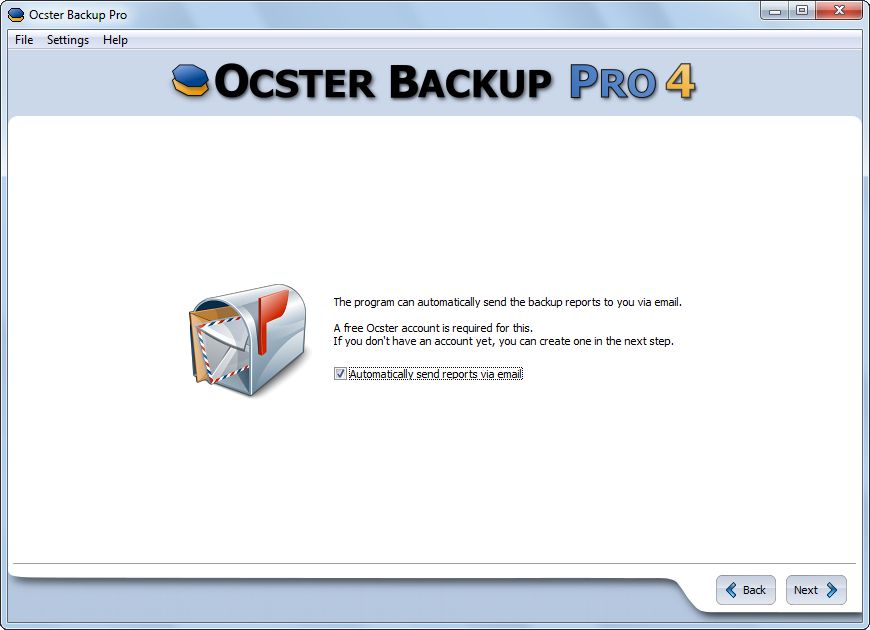
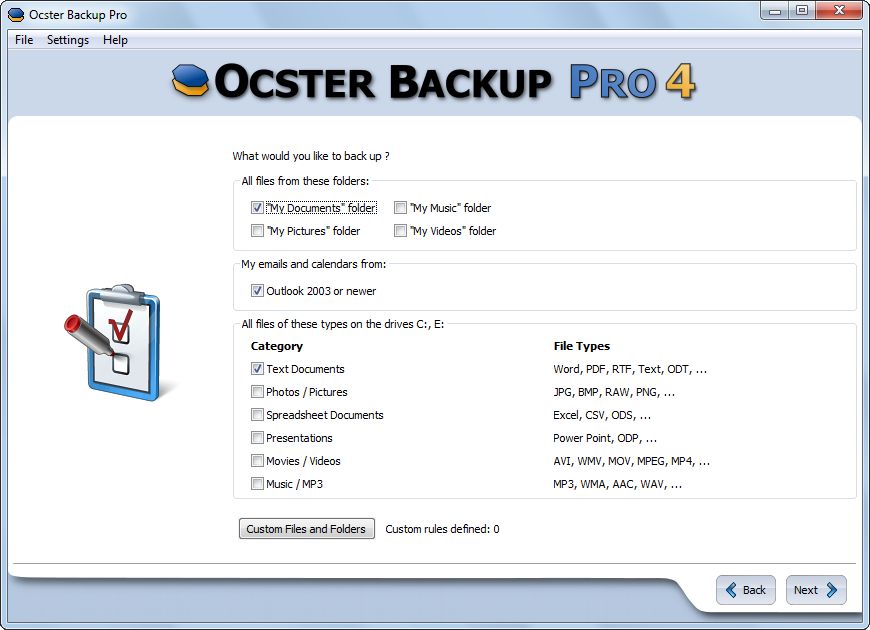
Ocster Backup Pro 4 es un software de copia de seguridad grande, que fue diseñado desde el principio para trabajar de forma totalmente automática. Usted sólo tiene que especificar qué y cuándo desea realizar copias de seguridad y luego el software se encarga del resto. Una característica especial llamada "pausa automática" automáticamente hará una pausa en el proceso de copia de seguridad cuando se necesita toda la potencia de su equipo. Nunca se estanca por el software de copia de seguridad de nuevo!
Nuevo en la versión 4:
- Automatic Pausing: Ocster Backup Pro 4 tiene como objetivo nunca ralentizar el equipo cuando lo necesite. Efectuará un seguimiento de los recursos de otros programas uso y se detiene automáticamente cuando detecta que podría ralentizar las cosas
- Outlook support: realiza copias de seguridad de Microsoft Outlook e-mails y calendarios funciona muy fácil (con Outlook 2003 o superior)
- Improvements "under the hood": un mejor rendimiento, compatibilidad y otros aspectos del servicio de copia de seguridad
The current text is the result of machine translation. You can help us improve it.
Requerimientos del Sistema:
Windows XP/ Vista/ 7
Publicado por:
OcsterPágina Oficial:
http://www.ocster.com/ocster-backup-pro-4/enTamaño del Archivo:
20.7 MB
Precio:
$39.90
GIVEAWAY download basket




Comentarios en Ocster Backup Pro 4
Please add a comment explaining the reason behind your vote.

Just a warning. If this application uses a proprietary format for backups, then it means that you'll have to have the application installed in order to access your backups. Since this is a giveaway and you cannot reinstall it, it might be wise to make sure that you can access that data some other way. If you have to, for one reason or another, reinstall your OS, or something of that nature, you may not be able to install this application and will be forced to purchase it, or won't have access to your data.
Just a warning for those who are unaware, because a proprietary format means that it can only be opened by the Ocster. That's why some backup programs will allow you to choose a non-proprietary format such as ISO or ZIP, etc.
Wouldn't like to see anyone lose a huge backup and/or be forced to buy software which they might not otherwise buy.
~Cheers

The Good
* Straightforward and easy to use.
* Nice, aesthetically pleasing interface.
* Allows users to backup individual files or whole folders.
* Includes handy "shortcuts" for easy backup of common folders, and file extensions.
* Has the ability to easily backup Microsoft Outlook (2003 and higher) emails and calendars.
* Includes an "exclusion" filter which users can use to exclude specific files, folders, or file extensions from being backed up.
* Has an "automatic pausing" feature that automatically pauses/resumes backups based on current computer usage (i.e. if you are doing something on your computer that is resource intensive, the backup will be automatically paused and will be automatically resumed when computer resources are freed up).
* Allows users to restore files/folders selectively.
* Has multiple methods of compressing and encrypting backups.
* Allows users to schedule backups to automatically occur.
* Gives users the ability to keep extensive reports and automatically e-mail the reports.
The Bad
* Uses a proprietary format for the backed up data.
* When restoring backups, password is left in the password field (and appears the next time user runs a restore) unless user manually removes it.
* Lacks different backup methods.
* Aside from Microsoft Outlook, lacks the ability to easily backup third party software related data.
* Automatic backups can only be scheduled for a daily or weekly basis.
* Sending out backup report e-mails requires users to register (for free) with Ocster - no ability to use own e-mail address.
Free Alternatives
GFI Backup
Backup4All Lite
FBackup
For final verdict, recommendations, and full review please click here.
Ashraf forgot to mention a great free alternative: Cobian Backup 10.
It's a decent backup software 100% stable on both 32 and 64-bit Windows.
http://www.cobiansoft.com/cobianbackup.htm
THE BAD
- Imaging a drive with 20Gb used space took over 4h.
Thanks but no thanks.
True Image Home does the same in 6-12minutes.
#2: "Just a warning. If this application uses a proprietary format for backups, then it means that you’ll have to have the application installed in order to access your backups. Since this is a giveaway and you cannot reinstall it, it might be wise to make sure that you can access that data some other way..."
Not To Worry.
Installed the GOTD version to evaluate & get unlock code -- at the end of install a window pops up with links to register at the Ocster site. Restored the XPMode VM, installed the regular download from their site -- unlock code works with it too.
So if you lose your GOTD install for whatever reason, you can use the 30-day trial to restore, & if you've held onto your key, register it for full version. That said, I did not check to see if Ocster makes older versions available for download -- you may want to download & save the app a 2nd time from the Ocster site, following the link at the top of the GOTD page.
Ofertas de hoy para iPhone »





Ofertas de hoy para Android »





I read this article completely regarding the resemblance of most recent and previous technologies, it's amazing article.|
Save | Cancel
Yo, ya llevo tiempo pidiendoles a los de 'G.o.t.D.', que adviertan a los usuarios de las posibilidades referente a la variedad de idiomas. Pero por el momento, 'Nasti de Plastic'.
Save | Cancel
Acabo de darme cuenta de que este programa no sirve de nada.Si vale para hacer buckups cuando tengas un problema (normalmente formatear) resulta que sólo puedes recuperar la información CON EL MISMO PROGRAMA,que ya no será gratis.
Save | Cancel
Bueno,ya os lo digo yo: no.Sólo en inglés y alemán.
Save | Cancel
Supongo que nadie me va a decir si está en español.
Have spanish language the program?
Save | Cancel