Cada día ofrecemos un programa licenciado GRATIS que de otra manera tendrías que comprar!
Giveaway of the day — SoftSkin Photo Makeup 1.0
SoftSkin Photo Makeup 1.0 estaba como Giveaway el día n 5 de julio de 2012

Producir retratos perfectos a partir de las fotografías comunes,! SoftSkin Foto Makeup perfecciona sus retratos mediante la eliminación de pequeñas imperfecciones, mejorar el tono de la piel y la textura, y la aplicación de todos los elementos básicos de maquillaje virtual. Todo lo que se puede hacer fácilmente en sólo unos pocos clics.
SoftSkin Photo Makeup hace que sea más fácil de producir impresionantes retratos, eliminando las imperfecciones de la piel, como granos y pecas, incluso el acné y las arrugas, suavizar las sombras duras y darle a su retrato de un aspecto acabado. SoftSkin Photo Makeup puede arreglar el efecto de ojos rojos completamente en tan sólo un clic
Características:
- Retocar imperfecciones de la piel;
- Mejorar la textura de la piel;
- Blanquear los dientes y los ojos;
- Esbozo de los Ojos;
- Eliminar ojos rojos.
No se pierda la oferta especial de SoftOrbits para los usuarios GOTD – 70% de descuento en todos los títulos durante el período de giveaway! Utilice el código PPGCUP para aplicar el descuento.
The current text is the result of machine translation. You can help us improve it.
Requerimientos del Sistema:
Windows XP/ Vista/ 7
Publicado por:
SoftOrbitsPágina Oficial:
http://makeupphoto.org/Tamaño del Archivo:
11.6 MB
Precio:
$49.95
Mejores Titulos
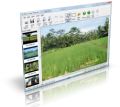
Photo Stamp Remover is a photo correction utility that can remove watermarks, date stamps, scratches, dust, stains, wrinkles, tears and other unwanted artifacts that appear on photographs. Offering a fully automatic process, the program uses an intelligent restoration technology to fill the selected area with the texture generated from the pixels around the selection, so that the defect blends into the rest of the image naturally. What takes hours to correct using the clone tool, can be accomplished in a minute using Photo Stamp Remover.
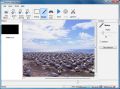
Remove Logo Now! is an unique application that can easily remove annoying watermarks and logos from video files. The program is completely automatic, meaning that you won't need to manually analyze the video streams or detect static overlays; the program will do it all for you. With the Remove Logo Now! software you will be able to easily and quickly process videos, of different types, from popular AVI, WMV and MOV to rare MP4, DVD, MP2, M1V, SWF, M2V, FLV, SVCD and more. You will get a chance to edit the video while deleting logotypes from it; with this software you can change the video's bitrate and frame rate or convert it to different formats.
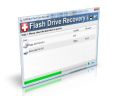
SoftOrbits Flash Recovery is a Flash data recovery tool. It can recover data from any type of storage media (music sticks, digital cameras, flash drives, USB drives, PC cards, etc). This tool restores all corrupted and deleted photos, documents, mp3 and other files even if a memory card was re-formatted. You can see recovered photos and other documents with the free trial version. After the program is purchased, you can save all files to your hard-drive. There is 100% Success Rate. You do not need to set any options - the entire process is done automatically with a built-in photo recovery wizard.
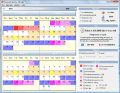
Advanced Woman Calendar helps you achieve or prevent pregnancy predicting your most fertile time of the month by monitoring your menstrual cycle. With an ovulation calendar in your hands, you can view and print a calendar of your safe days and your most fertile days.

Batch Picture Resizer is a new easy and user-friendly picture resizer and watermarking tool. It helps you to resize large groups of pictures in one go for the purpose of sending via email, publishing on the web or just to save space on your hard drive.
GIVEAWAY download basket


Comentarios en SoftSkin Photo Makeup 1.0
Please add a comment explaining the reason behind your vote.

Well, for what it does it looks good to me...so I can't figure out why it has received so many negative comments so far.
Of course, as unquestionable KING OF FREEBIES (LOL!!), I would never pay 50 bucks for a software like this GAOTD, not beecause I'm a stingy guy but because there are lots of FREE APPS out there which do even more things for FREE....
Obviously you should know them....IGNORANCE is STRENGHT, right?? LOL!!
Ladies & Gentlemen.....
FREE & BETTER ALTERNATIVES for you....here you go:
* (Portable) StylePix (==> my personal First Choice)
http://hornil.com/en/products/stylepix/Features.html
Screenshots:
http://www.softpedia.com/progScreenshots/StylePix-Screenshot-133549.html
(Video) Tutorials:
http://hornil.com/bbs/board.php?bo_table=sp_tip
http://hornil.com/en/community/HornilStylePixVideoTutorials.html
* GIMP
http://www.gimp.org/
* PaintNet
http://www.getpaint.net/
* PHOXO
http://www.phoxo.com/en/
* RawTherapee
http://rawtherapee.com/blog/features
* Pixia and Phierha (==> Softpedia Editor pick)
http://www.ne.jp/asahi/mighty/knight/aboutpixia.html
* Funny Photo Maker
This is a free cool app I came accross by chance recently, packed with plenty of amazing PhotoFunia-like templates designed to create high-quality images and professional artistic photos in unique style, to share on Facebook, Twitter etc... in BMP, JPG, PNG & GIF animation format, literally with a couple of mouse clicks.
http://www.funny-photo-maker.com/feature.html
Tutorials:
http://www.funny-photo-maker.com/howto.html
http://www.funny-photo-maker.com/how-to-edit-face-fun-photo.html
Samples Showcase:
http://www.funny-photo-maker.com/templates.html
Full review:
http://www.addictivetips.com/windows-tips/funny-photo-maker-apply-effects-insert-images-into-amusing-scenes/
But if you don’t want to install anything in your PC, no problem....
8 FREE ONLINE IMAGE EDITORS (==> Free Photoshop alternatives and photo quick-fix tools)
http://dottech.org/tipsntricks/12196/
So who said we have to buy PHOTOSHOP or spend lots of money to edit photos professionally??
Have a nice day!!
Enjoy!!

This software looks good and is fairly easy to figure out quickly, the only thing with it is, that if you have spent more than five minutes using Gimp (gimp.org) then you can already do all of the things that this software does, for free. This software isn't very intuitive, as the teeth whitener, lipstick, and most of the other options, require you to use a pen and go over the parts that you want to color. The whitener even makes you have to go over it several times if the teeth need more than a little whitening. If you are a novice, and want something that you can use to edit you photos, try it, you might like it. It is simple to figure out, and very straight forward. You may have a little bit of difficulty using the brush, but with a little practice that will get better. If you are anything more than a novice, keep using Gimp, Photoshop, or whatever it is that you are already using.
Very unimpressed. It does a fair and easy job at what it does, but that's it. The popular freewares (Gimp, Irfanview, PhoXo) all do it better, and they do more. I saw no need to keep it as it brings nothing special to the table. And the $50 price tag is an absolute joke.
The only good thing i can say about this program (having worked with graphic programs for 15+ years) is GOTD install worked flawlessly as usual. The program itself, however, is a cruel joke you would only wish on an enemy. I can't imagine ever paying for this product.
At the end of the toolbar it has an option to add a dozen or so more toolbars via drop menu. No options to add buttons or anything to the toolbar itself. You may also hide the toolbar and Source Images, though I don't know why you would. The buttons are large and childlike. The concealer brush option doesn't attempt to match the color at all and when I attempted to it always came out white anyway.
Lipstick brush is a slightly transparent red and eye pencil slightly transparent black draw. Of the three photos I attempted to use, one disappeared from the folder and has not rematerialized, while another will have to be found and rescanned as it now says "Not a JPEG file: starts with 0x50 0x61". The Selection Marker only marks the screen in red, does NOT undo...ever. Clicking Original Image only shows you what your original image was but doesn't revert to it.
I did NOT save changes to my images, as they were HORRID. I did click the X to close and got no notification that my images were not saved but somehow it ate one of my photos anyway.
I can get a far higher quality program from Paint.Net, Gimp and even Microsoft Paint for free, and they don't eat my files. To charge someone $50 to finger paint their family photo is outrageous. I will absolutely be deleting this program now.
Anyone using a virtual app such as Sandboxie will no longer be able to test the applications the program installs directly in windows. In a sandbox the message you get is : "The setup files are corrupted. Please obtain a new copy of the program." My question is what trash is beeing added to my operating system?
I call this bad business practice lucky for softwares that monitor installations.
As for SkyFrontier post in the forum : http://www.giveawayoftheday.com/forums/topic/12376
That's probably the same thing happening... and what's with the 100% system load? on XP home and pro
As for today's program it's a useful tool to have when you're not a graphic designer.
Ofertas de hoy para iPhone »





Ofertas de hoy para Android »





/\
Save | Cancel
Save | Cancel
*
Save | Cancel
virus!!!!
Save | Cancel