Cada día ofrecemos un programa licenciado GRATIS que de otra manera tendrías que comprar!
Giveaway of the day — Sound Editor Deluxe
Sound Editor Deluxe estaba como Giveaway el día n 7 de febrero de 2011
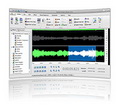
Sound Editor Deluxe es el software visual digital multifunción de edición de audio para Windows. Con este editor de audio y editor de música nunca será una molestia. Puede ver la música ahora y puedes editar datos de audio usando la marca nueva interfaz visual.
Características:
- Reproducir, editar, mezclar, y analizar de audio;
- Grabar audio desde casetes, discos de vinilo, la radio, etc través del line-in del computador ;
- Registro de dictado a través de un micrófono o dictado reproducir a una velocidad más lenta para la transcripción (con control de pedal);
- Grabar y editar audio para los sistemas de podcasting o por teléfono;
- Aplicar efectos especiales, tales como decoloración, ecualizador, Doppler, mecanizar, eco, invertir, flanger, y más
- Remasterizar digitalmente y restaurar grabaciones antiguas con reducción de ruido y el pop / filtros, haga clic en etc.
The current text is the result of machine translation. You can help us improve it.
Requerimientos del Sistema:
Windows 2000/ XP/ Vista/ 7/ Server 2003/ 2008
Publicado por:
SED SystemsPágina Oficial:
http://www.soundeditordeluxe.com/Tamaño del Archivo:
17.4 MB
Precio:
$29.99
Mejores Titulos
Free Online Radio Player Recorder is an advanced online radio player to play radio channels online, watch TV online. It allows you to watch directly over several hundreds of free Internet TV channels and listen to a large great number of online radio stations on your PC. All Internet TV channels and radio stations are from different countries with nearly different languages. There is no need for a PC TV card because the TV channels are streamed through your internet connection.
GIVEAWAY download basket




Ofertas de hoy para iPhone »




Ofertas de hoy para Android »





Comentarios en Sound Editor Deluxe
Please add a comment explaining the reason behind your vote.
The program registered easily on my Windows 7 64x. (You have to click on the 'Help' menu to register.)
I did a quick test using a microphone and found it to be very easy to use. With all of the effects I am anxious to experiment with my guitar. There are many more features than are mentioned in the description.
Audacity is the closest freeware app I know of that is similar to this but this definitely has a lot of cool features that Audacity doesn't have. The asking price is reasonable too.
Thumbs up!
Save | Cancel
Sound Editor Deluxe is a nice front end for several NCT code libraries [e.g. NCTAudioPlayer2.dll]. The upside is that for the most part they work well -- on the downside they are limited by no plugin support & compatibility problems... several people have complained in the past that they won't work for them in Vista for example. In this case a dozen NCT files are added to Windows' system folder & registered with Windows, though nothing new compared to the 24 NCT files that other apps had already installed for me -- in that respect they're a bit like the VB runtime files, installed once & (re)used by several apps. If you've already got the NCT stuff, installing an app like Sound Editor Deluxe is no big deal -- if not those 12 files can cost you 3k+ new registry entries.
As far as GUI design Sound Editor Deluxe isn't bad [screenshot on their site - http://goo.gl/x9LcJ ], with FX & filters on the left side & on the toolbar. Importing/opening audio is a bit unconventional -- it seems as if you're opening a separate applet with several menu choices, & separate apps are used if you choose Import from Video or Get from YouTube. The Import from Video option BTW seems to be how you import formats like ac3, inside [muxed] a video file or on its own. When you open a .wav file it takes a few moments as the file's scanned -- I'm not sure if it temporarily saves waveform peak data or a duplicate copy since it's not stored in the Temp folders, but storage is temporary because you go through that every time you open the same .wav file... some apps save peak data etc. after this sort of initial scan so that delay only happens once, but today's GOTD Is Not one of them. Any other criticisms are similarly minor, like no 48 kHz preset [you can set it manually], & features that are not included in the help file. No plug-in support [neither DX nor VTS] is a deal-breaker for some, but many others could care less... plug-ins let you expand what you can do, the same as in an image editor, but many people are quite happy without them.
Installing Sound Editor Deluxe is all about those NCT files... the only registry entry I saw for the app itself was the uninstall key. It takes up ~53 MB with 77 files, 8 folders in the program's folder, & you get a 2nd folder under User\ App/Application Data\ where configuration data's stored. As above there are a dozen NCT files that found their home in Windows' system folder, adding 3k+ entries to Windows' registry.
All in all [& IMHO of course] Sound Editor Deluxe is a nice app *If* you don't mind or already have the NCT files, & you don't want or need things like plug-in support or ASIO [an alternative driver setup]. And it's a good deal on GOTD today. That said, I like Sound Forge -- BTW their Studio version isn't bad, from time to time you can find it for $0 after MIR, & both versions are available for download as a trial. I've also often had Creative Soundblaster soundcards, & the editing software that's included, while no match for Sound Forge is normally quite usable. And I normally have Nero &/or Roxio suites installed, & the included audio editors aren't bad at all -- I especially like the added SoundTrax multi-track app that came with Nero Multimedia Suite 10. Simply because I bought a Nero OEM disc in 2010 for ~$12 & then paid ~$35 for their Multimedia Suite over the holidays, I would have a problem paying $30 for an audio editor like Sound Editor Deluxe on it's own. As far as free/open source software goes, while it works well I'm not a fan of Audacity, much preferring Wavosaur [wavosaur.com].
Save | Cancel
You can register the software using your own name.
Save | Cancel
drewi #3, I also get an error when trying text to speech. If you need text to speech, get Balabolka. It's new and free.
Hari, #4, Yes, it can split up audio files. Go to 'Edit' then 'Trim Start, 'Trim End' and 'Fade Out and Trim'.
Soundoctor #9, Use GSpot to identify the codecs: http://www.ehow.com/how_5082723_identify-audio-codecs.html
Save | Cancel
This is a very nice, quality application. I've had it installed for just about fifteen minutes and I already fixed a live track where the lead singer talks for about 2 minutes after the song ends...ick! Now it fades out after the song is over, but before the singer starts rambling on. Love it! I realize I can do that with Audacity, but I am finding this software has some pretty cool tricks on its own. You can download music directly from You Tube videos. Thanks so much, GAOTD! A nice way to start out the week.
Penny
Save | Cancel