Cada día ofrecemos un programa licenciado GRATIS que de otra manera tendrías que comprar!
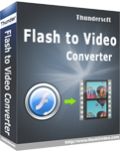
Giveaway of the day — ThunderSoft Flash to Video Converter 2.2.0
ThunderSoft Flash to Video Converter 2.2.0 estaba como Giveaway el día n 28 de septiembre de 2013

ThunderSoft Flash to Video Converter es un conversor profesional de Flash a Flash SWF y conversión de vídeo. Le ayuda a convertir Macromedia Flash SWF a video HTML5, AVI, MPEG, iPod / PSP (MP4), MOV, MKV, WMV, GIF y otros formatos más populares con ricas funciones de edición, como recortar, añadir marcas de agua.
Caracteristicas:
- Convertir SWF a formato de vídeo AVI, MPEG, MOV, MKV, WMV, FLV;
- Convertir SWF a formato de vídeo MP4 para su reproducción en iPod, iPhone, PSP;
- Convertir SWF a formato GIF animado;
- Soporta logo de imagen o marca de agua;
- Permitir la conversión por lotes;
- Permitir recortar la película flash;
- Perfil y define el formato de salida para establecer los parámetros de audio y vídeo;
- Soporta la conversión automática y el proceso de conversión de interacción con el usuario;
- La tecnología de captura de audio mantiene el 100% del efecto de sonido original;
- Audio preciso y sincronización de vídeo.
The current text is the result of machine translation. You can help us improve it.
Requerimientos del Sistema:
Windows 2000/ XP/ 2003/ Vista/ 7/ 8; CPU: Pentium IV 1.0 GHz or above; RAM: 512MB or above; Disk Space: 1 GB or above; Windows screen resolution: at least 1024dpix768dpi; Adobe Flash Player 9 or above
Publicado por:
ThunderSoft Co.Página Oficial:
http://www.thundershare.net/flash-to-video-converter/Tamaño del Archivo:
17 MB
Precio:
$69.95
Mejores Titulos

Create business web photo gallery, interactive flash gallery. With pre designed professional templates and 70+ transition effects. One day 50% off special offer

An incredibly easy-to-use software package that lets you make slideshow from your pictures and videos. One day 50% off special offer

Useful tool for video file to html5 conversion. The output supports all major web broswers: IE, Firefox, Apple Safari, Chrome, Opera, and can be viewed in iPad, iPhone. One day 50% off special offer
GIVEAWAY download basket




Ofertas de hoy para iPhone »





Ofertas de hoy para Android »





Comentarios en ThunderSoft Flash to Video Converter 2.2.0
Please add a comment explaining the reason behind your vote.
FLASH technology is dying day by the day...oh yeah the legendary STEVE JOBS was right about this tricky issue:
http://www.apple.com/hotnews/thoughts-on-flash/
So a tool like this GAOTD may be very handy especially if you own a website and are eager to make it readable on portable devices. So if you own a website this GAOTD may be very useful for you.
But 70 BUCKS to perform just a such a conversion (from FLASH to VIDEO)?? Is it a joke, right?
* Portable XMedia Recode (==> My Personal First Choice)
Crazy all-in-one FREE & PORTABLE Video and Audio conversion tool, which can convert at high speed any DVD/Blu-Ray movies/Audio files flawlessly into any other format you like, giving you even the option to pick your iPhone model.
With this FREE app advanced users are also able to:
- syncronize both Audio and Video files with ease
- modify bitrate & keyframe interval
- change the framerate and the rate control mode of both videos and audio chapters
Supported input formats (so not just FLASH ==> LOL!!):
3GP, 3G2, AAC, AC3, AIFF, AMR, APE, ASF, AVI, AviSynth, AU, DVD, DTS, E-AC3, FLAC, FLV, H.261, H.263, H.264, M2TS, M1V, M2V, M3U, M3U8, M4A, M4P, M4V, Matroska, MMF, MP2, MP3, MP4, MP4V, MP3, MPEG-1, MPEG-2, MPEG-4, QuickTime, Ogg, OGM, OPUS, PVA, REC, RealMedia, RMVB, SVCD, SWF, THP, TS, TRP, TP0, VCD, VOB, WebM, WMA, WMV, WPL
Supported VIDEO output formats:
Asus V1, Asus V2, MPEG-4 Part 2, MS MPEG4 V2, MS MPEG4 V3 DV Video, Flash Video, Flash Screen Video, H.261, H.263, H.263+ H.264/MPEG-4 AVC (using x264), Huffyuv, M-JPEG, MPEG-1, MPEG-2, Theora, VP8, WMV V7, WMV V8
Supported AUDIO formats:
AAC, AC3, ADPCM MICROSOFT, ADPCM YAMAHA, A-LAW, AMR NB, AMR WB, MP2, MP3, OPUS, Vorbis, WAV-PCM 16 little endian, WAV-PCM 16 little endian, WAV-PCM 24 Little-Endian, WAV-PCM U8, WMA V7, WMA V8
Subtitle formats[edit source]
.ass, .jss, .js, .ssa, .srt
http://www.softpedia.com/get/PORTABLE-SOFTWARE/Multimedia/Video/Portable-XMedia-Recode.shtml
Wanna just convert FLASH animations to HTML5 with no code knowledge for FREE?
https://www.google.com/doubleclick/studio/swiffy/gettingstarted.html
http://www.flash-to-html5.net
But how about doing the opposite conversion?
Let's say you have a VIDEO and want to publish it in FLASH format on the home page of your own website. So wouldn't it be great to have a tool able to convert your videos to Flash animation format, with the ability to generate the corresponding HTML code so as to insert your SWF video on your homepage for FREE?
http://soft4boost.com/video-to-flash
Enjoy!!
My 2 cents for today's giveaway!!
Save | Cancel
I don't agree with what #1 said. Maybe he didn't know the software is flash to video converter software, not video converter software.
It's one of the best swf to video software I've ever tested. The only thing that should be noticed is file size. If you choose good quality and high resolution in setting, the result video file has very large size.
Save | Cancel
Free Alternative: XviD4PSP 5.10.330.0
i use this to convert Flash Movies to MP4 and add subtitles if needed.
(i am not using the new 7.0.6 Beta, not saying it has a problem, i just have not tried it)
Xvid4PSP is an easy to use and high quality all-in-one program for converting videos for PSP, PS3, iPod, BlackBerry, Iphone, Nintendo DS, Xbox 360, SonyEricsson, Nokia, Itouch, Blu-ray and PC like AVI, DV, MP4, M2TS, MKV with H.264, XviD, MPEG2 video and AAC, AC3, MP3 audio. Hardcode subtitles. Requires .Net framework.
XviD4PSP
Save | Cancel
Here's the guide showing how to use ThunderSoft Flash to Video Converter
http://www.thundershare.net/flash-to-video-converter/guide.html
.
This isn't a video converter, & it isn't a Flash disassembler -- it does let you import Flash animations, interactive or not, & then it records the playing animation to a video file, as in screen capture.
Since you play the animation in the program window rather than in your browser, it **may** use less of your PC's/Laptop's resources, so you have more available for the screen capture. I'd guess that since you're not using a browser, if your security software monitors every web page visited, you'd save a little overhead there too.
That said, I'd expect lots of people will ask: "Why?" Other than recording / converting a Flash animation to use as wallpaper on a tablet or cell, I can't think of anything.
Save | Cancel
Installed and registered without problems on Windows 7, 64 bit, i7.
I am flabbergasted! This program did a fine job with every SWF file I tossed at it, both animations, animated vector graphics and flash slide show galleries. The only other program that did as well was iWisoft's Flash To Video Converter and I only had the trial for 30 days 6 months ago.
The SWF files I tested were converted (to MPG-4 and WMV) in very good quality. Their audio tracks converted fine. The videos that were produced were exact copies of the SWF files that were converted.
Flash may be dying or dead somewhere but it's still very much alive and kicking in the graphics and animation programs and flash gallery programs that live in our computers.
I've been searching for a good SWF converter for ages. A lot of video converters list SWF files but only output video to SWF. I don't say this often about cold, inanimate pages of code but, from what I've seen of it so far, I love this program.
Save | Cancel